
Calendar Sync Between Two Microsoft 365 Tenants
By CalendoxPublished Updated 9 min read
In short
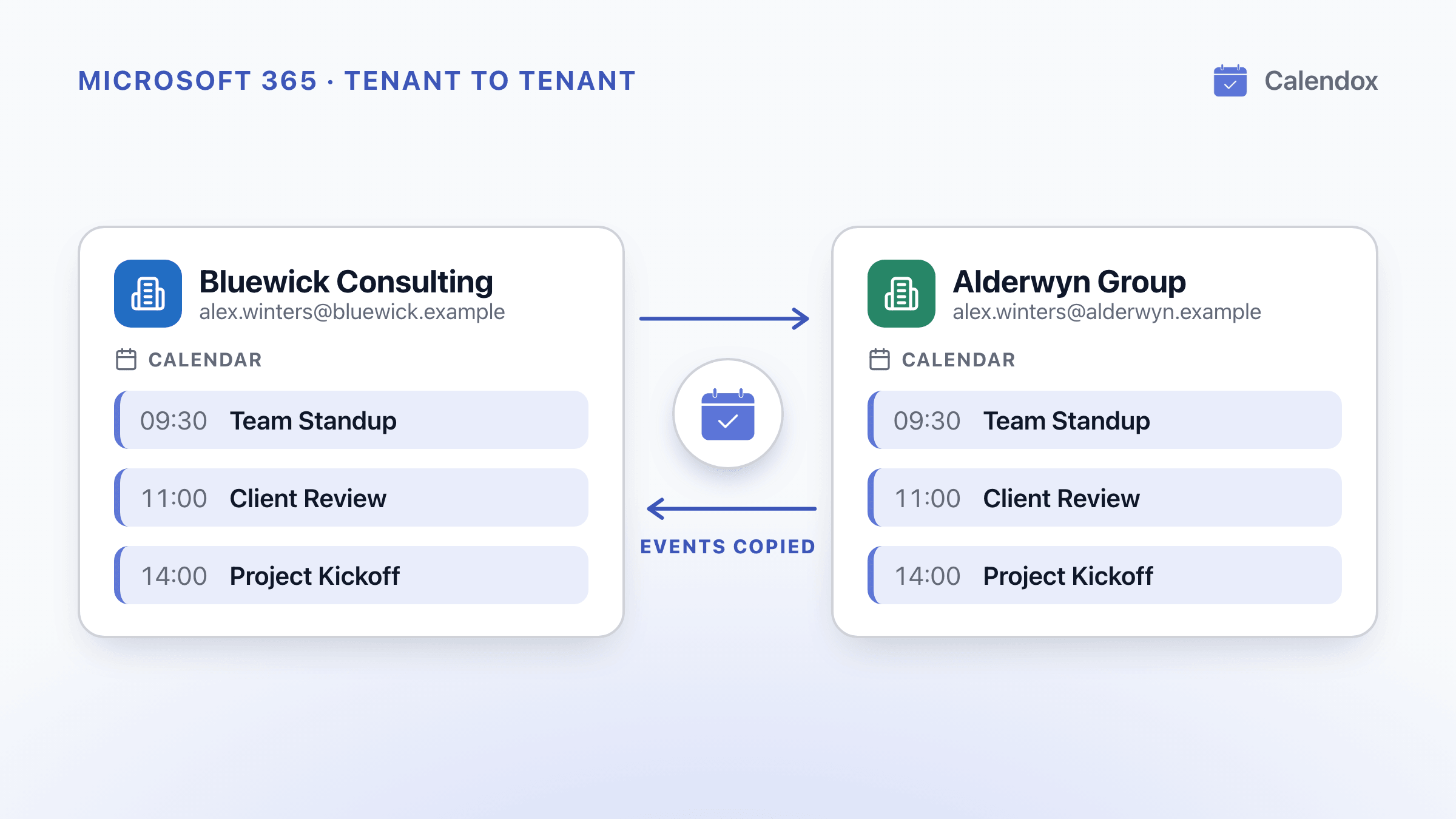
Microsoft 365 can share free/busy and read-only calendars between two tenants, but none of its built-in options copies events into the other tenant's calendars. From October 1, 2026, the EWS shutdown also changes how that sharing is set up.
- Built-in Microsoft 365 options share availability or a read-only view across tenants. None copies events into the other tenant's calendars.
- From October 1, 2026, Microsoft gradually disables Exchange Web Services. Cross-tenant sharing set up through organization relationships or sharing policies stops working as that reaches a tenant.
- The replacement is the Microsoft 365 Cross-Tenant Access Policy, set up in both tenants for two-way sharing. Setting EWSEnabled to True is a stopgap until April 1, 2027.
- To have meetings in both tenants' calendars, the events must be copied, with a Power Automate flow you build or with Calendox Enterprise.
Can Microsoft 365 keep calendars in sync between two tenants on its own?
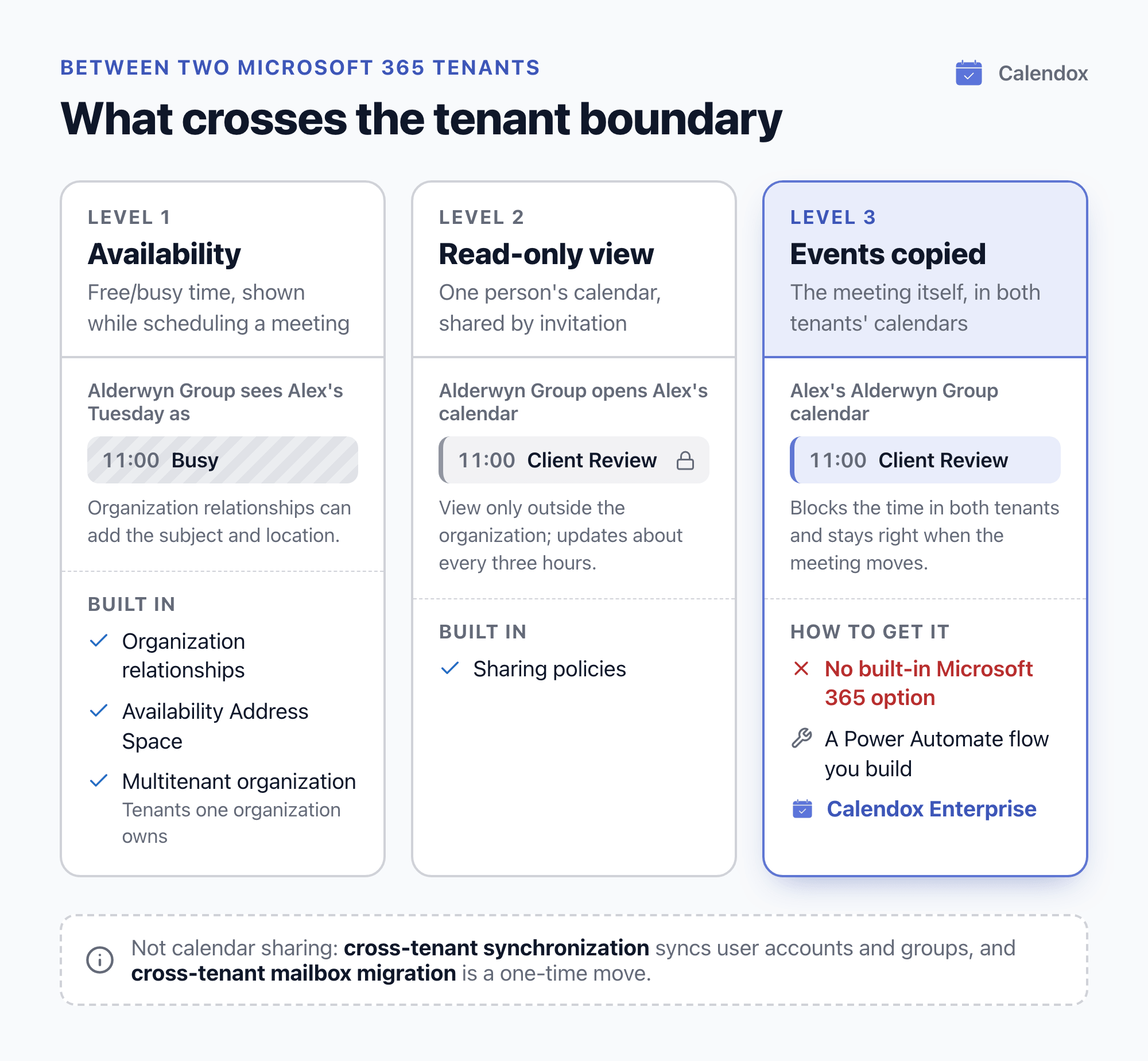
No. Microsoft 365's built-in options show availability, or a read-only view of a calendar, across tenants. None of them copies events into the other tenant's calendars.
On a Microsoft Q&A thread, a Microsoft Community moderator wrote that live syncing of both calendars "is not possible natively in O365". The moderator pointed to Power Automate flows or third-party tools instead.
That matters after a merger, for subsidiaries that keep their own tenants, and for anyone who works in two organizations. People need their meetings in both calendars, not only a view of the other tenant's free time.
What does each built-in Microsoft 365 option share across tenants?
| Option | What it shares | Main limits |
|---|---|---|
| Organization relationships | Free/busy time only, or time plus subject and location | Set up in both tenants; shows availability when scheduling, not calendars |
| Sharing policies (calendar invitations) | A view of one person's calendar | View-only outside the organization; updates about every three hours |
| Availability Address Space | Free/busy | Not affected by the EWS change, according to Microsoft |
| Multitenant organization (MTO) | Free/busy (time only) | Only tenants one organization owns; not between a CSP and its customers |
| Cross-tenant synchronization | User accounts and security groups | No mailbox or calendar items |
| Cross-tenant mailbox migration | Moves mailboxes, calendars included | A one-time move, not an ongoing sync |
Organization relationships
Microsoft says an organization relationship shares either free/busy time only, or free/busy including time, subject and location.
- It must be set up in both tenants, and each tenant chooses what the other can see, so the two levels can differ.
- Each user's own calendar permissions still apply.
- It shows availability, not the calendar itself. A Microsoft moderator on Microsoft Q&A explains that to open another tenant's calendar in Outlook, its owner has to send a sharing invitation.
Sharing policies
With sharing policies, a user shares a calendar with someone in another organization by email invitation.
- Access is view-only. Microsoft says you can't give editor or delegate access to people outside your organization.
- A calendar shared with another Microsoft 365 tenant updates approximately every three hours when external sharing is enabled in the owner's tenant.
- If the owner removes access, the other person's copy isn't deleted, but it stops receiving updates.
Availability Address Space
An Availability Address Space using the OrgWideFBToken access method shares free/busy with another Microsoft 365 tenant. Microsoft says it doesn't depend on Exchange Web Services and isn't affected by the EWS deprecation.
Multitenant organization (MTO)
Microsoft describes an MTO as a boundary around the Microsoft Entra tenants one organization owns, used mainly for Microsoft Teams and Viva Engage.
- Its calendar sharing shows free/busy (time only) and is built on organization relationships.
- It requires Microsoft Entra ID P1 licences.
- Microsoft says it isn't allowed between a Cloud Solution Provider (CSP) and its customer tenants.
Cross-tenant synchronization
Microsoft says cross-tenant synchronization creates, updates and deletes users and security groups across the tenants of one organization. It syncs accounts, not mailbox or calendar items, and Microsoft says it isn't a migration tool.
Cross-tenant mailbox migration
Cross-tenant mailbox migration moves Exchange Online mailboxes, calendars included, into a new tenant during a merger or divestiture.
- The source mailbox is deleted after the move, so it's a one-time move, not an ongoing sync.
- Each migrated user needs a one-time add-on licence.
- Teams meeting links must be recreated afterwards.
What changes as Microsoft disables EWS from October 1, 2026?
Microsoft's EWS deprecation page lists October 2026 as when Exchange Web Services starts to be disabled, and April 2027 as when it is fully disabled. The Exchange team says the shutdown is gradual and tenant by tenant. A tenant whose EWSEnabled setting is still at its default is switched off as the rollout reaches it.
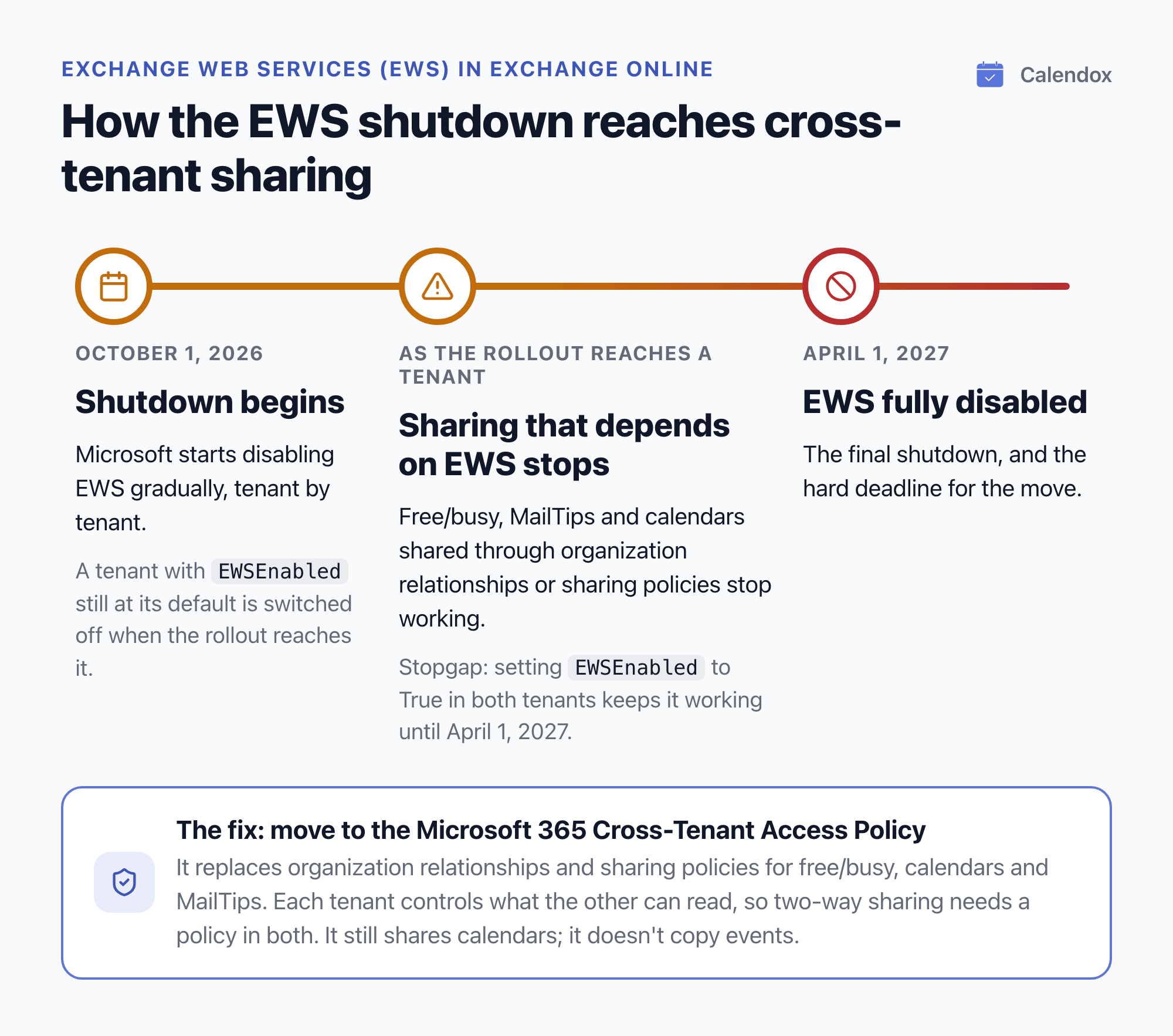
For cross-tenant calendars, the Exchange team warns that sharing which still depends on EWS stops working as the change reaches a tenant:
- Partner organizations may no longer see that tenant's free/busy, MailTips or shared calendars.
- Its users may no longer see the partner's.
The change covers free/busy, calendar and MailTips sharing with other Microsoft 365 organizations set up through organization relationships or sharing policies. Sharing within one organization isn't affected.
Which direction of sharing breaks?
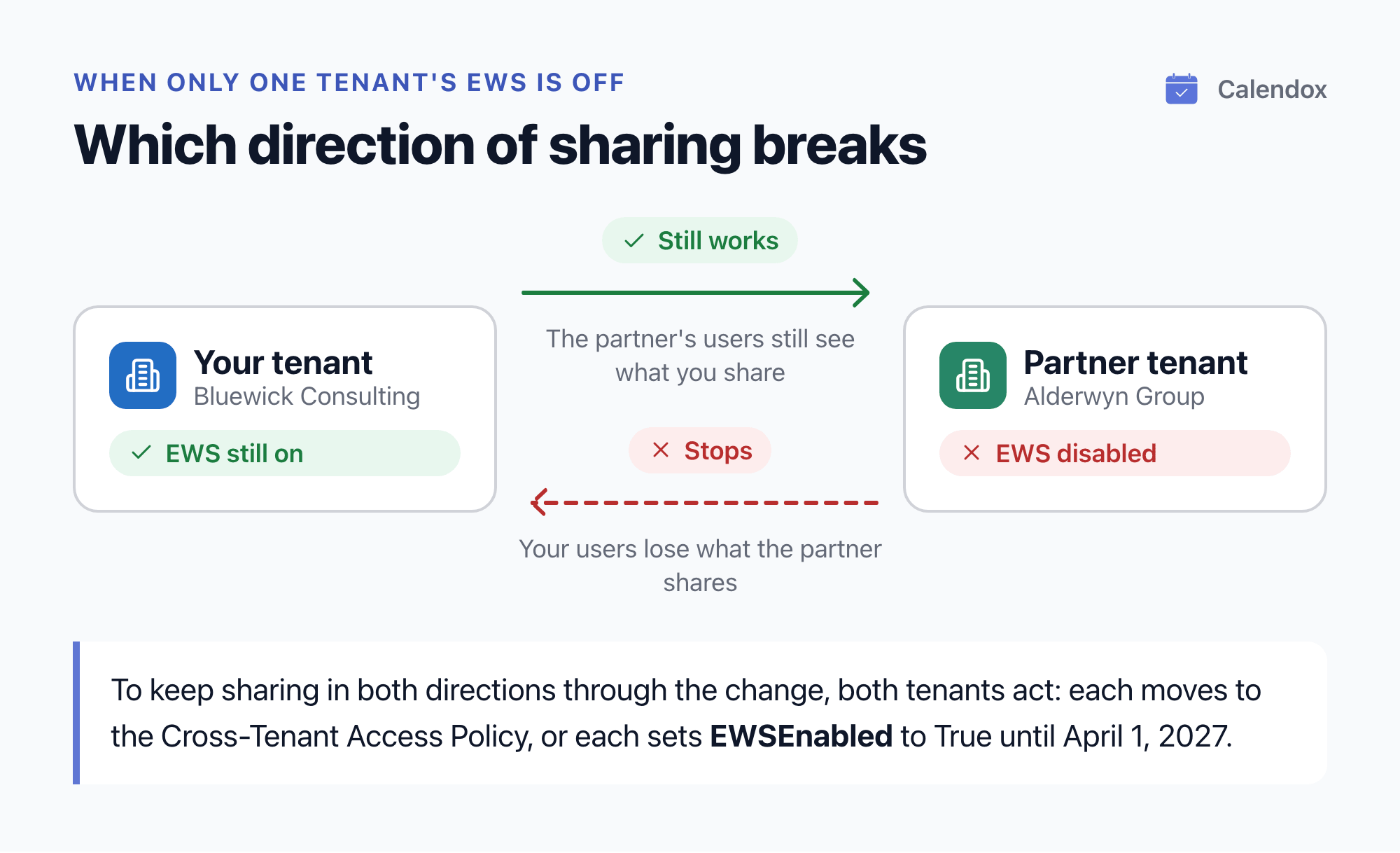
It depends on which tenant's EWS is off. If only the partner's is off, your users lose what the partner shares, while the partner still sees what you share.
How do admins keep cross-tenant free/busy working through the change?
Microsoft calls the Microsoft 365 Cross-Tenant Access Policy the new standard for collaboration between Microsoft 365 tenants. It replaces organization relationships and sharing policies for free/busy, calendars and MailTips. The Exchange team says only the mechanism changes: the policy still shares calendars; it doesn't copy events.
In outline, the move looks like this:
- Check that both tenants have the policy. Microsoft's migration guide says it's still rolling out and may not have reached every tenant.
- Agree the move with the partner's administrator. The policy is an inbound setting: each tenant controls what the other can read. For sharing in both directions, both organizations create complementary policies.
- Set up the trust and the sharing. A Global Administrator creates the Entra cross-tenant trust, and a Global or Exchange Administrator configures the free/busy sharing. Partners are identified by tenant ID.
- Turn off the old settings in both tenants, then test. Existing organization relationships, Availability Address Spaces and sharing policies take precedence over the new policies. Both organizations must turn them off before testing, even for one-way sharing, in coordination with the partner's administrator.
Stopgap: setting EWSEnabled to True keeps existing cross-tenant sharing working until the final EWS shutdown on April 1, 2027, which the Exchange team calls the hard deadline. Both organizations must set it to keep sharing in both directions.
Can Power Automate copy events between tenants?
It can, with work. Microsoft's Office 365 Outlook connector has a trigger for when an event is added, updated or deleted, and actions to create, update and delete events. The connector's documentation notes two pitfalls:
- A change to a recurring series fires the trigger for every occurrence.
- Accepting a meeting invitation fires the new-event trigger a second time.
When do you need the events copied, not just availability shared?
Availability sharing answers one question: is this person free when someone schedules a meeting? It doesn't:
- put a client meeting into a consultant's home calendar;
- block the time in the second tenant;
- keep both calendars right when the meeting moves.
For that, the events themselves have to be copied between the tenants and kept up to date.
How does Calendox Enterprise sync events between two tenants?
Calendox Enterprise is an account type that connects Microsoft 365 organizations at the tenant level:
- Start a trial. Sign up for an Enterprise account. The 14-day trial needs no credit card and syncs up to 5 imported secondary-tenant calendars in total.
- Grant consent once. A tenant administrator with a mailbox grants admin consent for the whole organization, and employees never sign in to Calendox. The consent covers reading and writing calendar events and listing users, not email, files or contacts (permissions). The first tenant you connect becomes the master tenant, and its calendars don't count against your seats.
- Connect the other tenant. An administrator of the partner, subsidiary or client tenant grants consent the same way. Each calendar connected from that secondary tenant uses one seat.
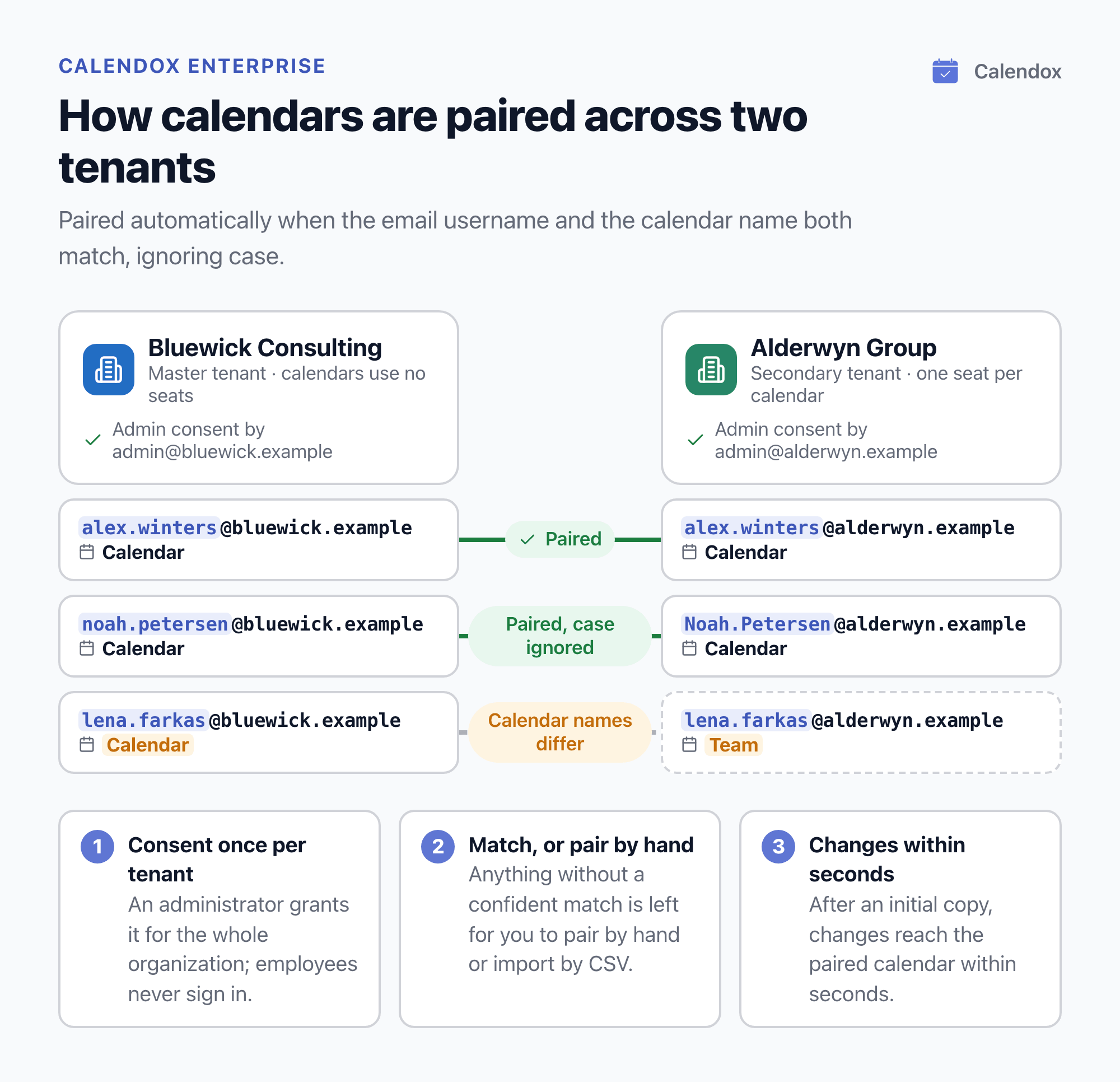
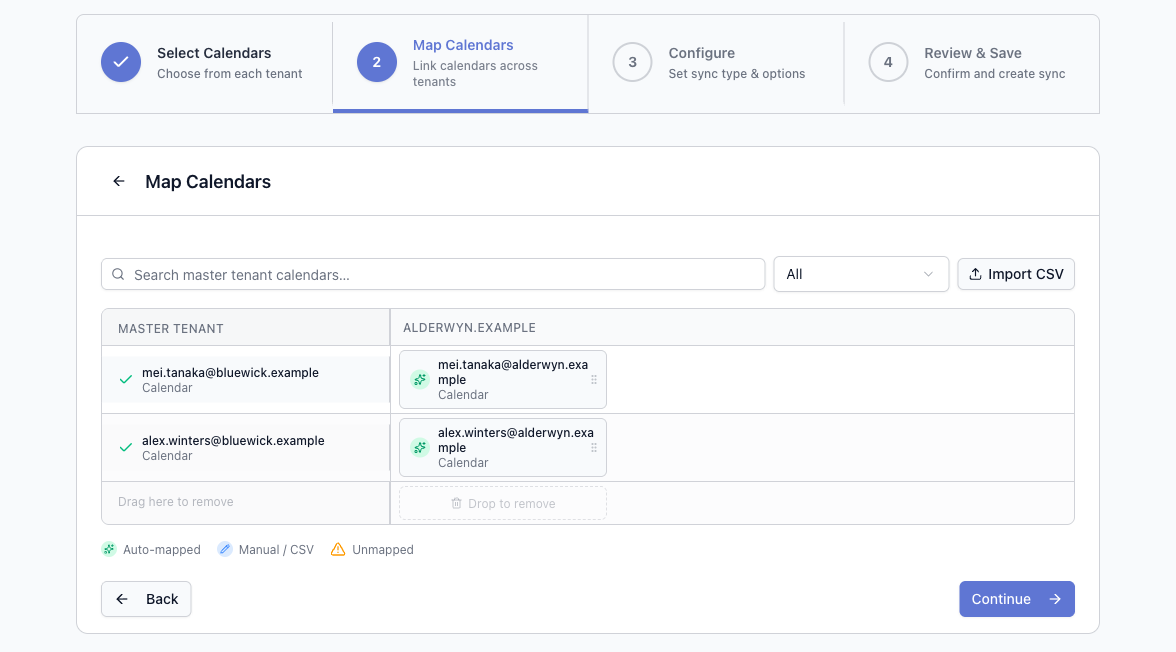
- Map the calendars. Calendox pairs a master calendar with a secondary calendar automatically when both the email username (the part before the @) and the calendar name match, ignoring case. Anything without a confident match is left for you to pair by hand, or you can bulk-import users by CSV. Auto-mapping never guesses.
- Review and create the syncs. The review step shows how many syncs will be created and flags any calendar that couldn't be mapped. After an initial copy, changes reach the paired calendar within seconds.
Calendox never stores event titles, descriptions or locations. Enterprise is sync only: it has no booking pages or unified calendar, and tenant-wide connection is available for Microsoft 365 only. Seats are priced per imported secondary-tenant calendar; see pricing.
What do admins ask most about cross-tenant calendar sync?
Does Microsoft 365 sync calendars between two tenants natively?
No. It shares availability and read-only calendars between tenants, but none of its built-in options copies events between them. Power Automate flows can copy events, with the pitfalls described above.
Does a multitenant organization sync calendars?
No. An MTO's calendar sharing shows free/busy time only. An MTO requires Microsoft Entra ID P1 licences, and Microsoft doesn't allow one between a Cloud Solution Provider and its customer tenants.
What happens to cross-tenant free/busy after October 1, 2026?
Microsoft gradually disables Exchange Web Services from October 1, 2026. Cross-tenant sharing set up through organization relationships or sharing policies stops working as that reaches a tenant, unless both tenants move it to the Cross-Tenant Access Policy. Setting EWSEnabled to True is a stopgap until April 1, 2027.
How does Calendox pair calendars across two tenants?
A master calendar and a secondary calendar are paired automatically when both the email username and the calendar name match, ignoring case. Calendars without a confident match are left for you to pair by hand or by CSV import.
Can Google Workspace domains be connected the same way?
No. Tenant-wide connection is available for Microsoft 365 only. Google calendars are connected one user at a time, on Personal or Business accounts.
Sources
- Microsoft Learn: Organization relationships in Exchange Online
- Microsoft Learn: Sharing policies in Exchange Online
- Microsoft Support: Share and access a calendar with edit or delegate permissions in Outlook
- Microsoft Support: Calendar sharing in Microsoft 365
- Microsoft Q&A: How to share all calendars externally with another tenant
- Microsoft Q&A: Live sync calendars from different companies
- Microsoft Learn: What is a multitenant organization in Microsoft Entra ID?
- Microsoft Learn: Manage multitenant org settings
- Microsoft Learn: What is cross-tenant synchronization in Microsoft Entra ID?
- Microsoft Learn: Cross-tenant mailbox migration
- Microsoft Learn: Migrate to Microsoft 365 Cross-Tenant Access Policy
- Exchange Team Blog: Cross-tenant Free/Busy, MailTips, and Calendar Sharing are moving to Cross-Tenant Access Policy
- Exchange Team Blog: Exchange Online EWS, Your Time Is Almost Up
- Microsoft Learn: Deprecation of Exchange Web Services in Exchange Online
- Microsoft Learn: Office 365 Outlook connector