
Plans and Billing
Compare Calendox plans and their limits — the free trial, booking pages, upgrades, deferred downgrades, refunds, and what happens when a payment fails.
Calendox has three self-serve plans — Basic, Standard, and Premium — that differ in connected calendars, active syncs, and booking pages. Every new Personal or Business account starts with a 14-day free trial, and plans are billed monthly or annually.
Free trial
Every new account created at calendox.com gets a 14-day free trial — no credit card required. Enterprise trials are capped at 5 imported secondary-tenant calendars in total — see Enterprise accounts. On Personal and Business the trial gives you Premium-level limits: up to 25 connected calendars and 25 active syncs, including multi-way sync and the Unified Calendar, plus unlimited booking pages.
When the trial ends without a subscription, your active syncs are paused (they resume when you subscribe). Subscribe to a plan to reactivate syncs and resume syncing. On Business, a member's syncs resume once they hold a license from the team's subscription — see Team management.
The trial can only be used once per email address. Deleting your account and signing up again with the same email — or with a calendar provider account you've previously connected — does not grant a new trial.
Which plans are available?
| Feature | Basic | Standard | Premium |
|---|---|---|---|
| Connected calendars | 2 | 5 | 25 |
| Active syncs | 2 | 5 | 25 |
| One-way & multi-way sync | Yes | Yes | Yes |
| Unified Calendar | Yes | Yes | Yes |
| Booking pages | 2 | Unlimited | Unlimited |
| Support | Priority Email |
A "connected calendar" is each individual calendar you import — for example, your Google "Work" calendar and your Outlook "Personal" calendar count as two connections. Simply signing in to a provider does not count by itself; only the calendars you choose to import do.
Booking pages are public scheduling pages where anyone can book time with you — availability is checked across all your connected calendars, and each confirmed booking is created on a calendar you choose. The free trial includes unlimited booking pages, and on Premium the Calendox branding is additionally removed from your public booking pages. On unlimited tiers, fair-use limits apply to prevent abuse. Enterprise accounts do not include Bookings.
Meeting integrations (Zoom, Google Meet, Microsoft Teams) aren't a separate plan tier — they work as soon as you have at least one connected calendar to attach a meeting link to. See Meeting apps.
Personal and Business accounts can subscribe to any of these tiers. Enterprise is a separate account type rather than a plan tier on this table — see Personal, Business, and Enterprise accounts for how the account types differ, and Enterprise accounts for Enterprise specifics. Current prices for every tier are on the pricing page.
Upgrade your plan
- Go to Dashboard → Settings → Billing.
- Click Change Plan (or Subscribe Now if you don't have an active subscription).
- Select your desired plan and billing period (monthly or annual — on these plans, annual billing saves up to 22%).
- Complete payment via the secure checkout.
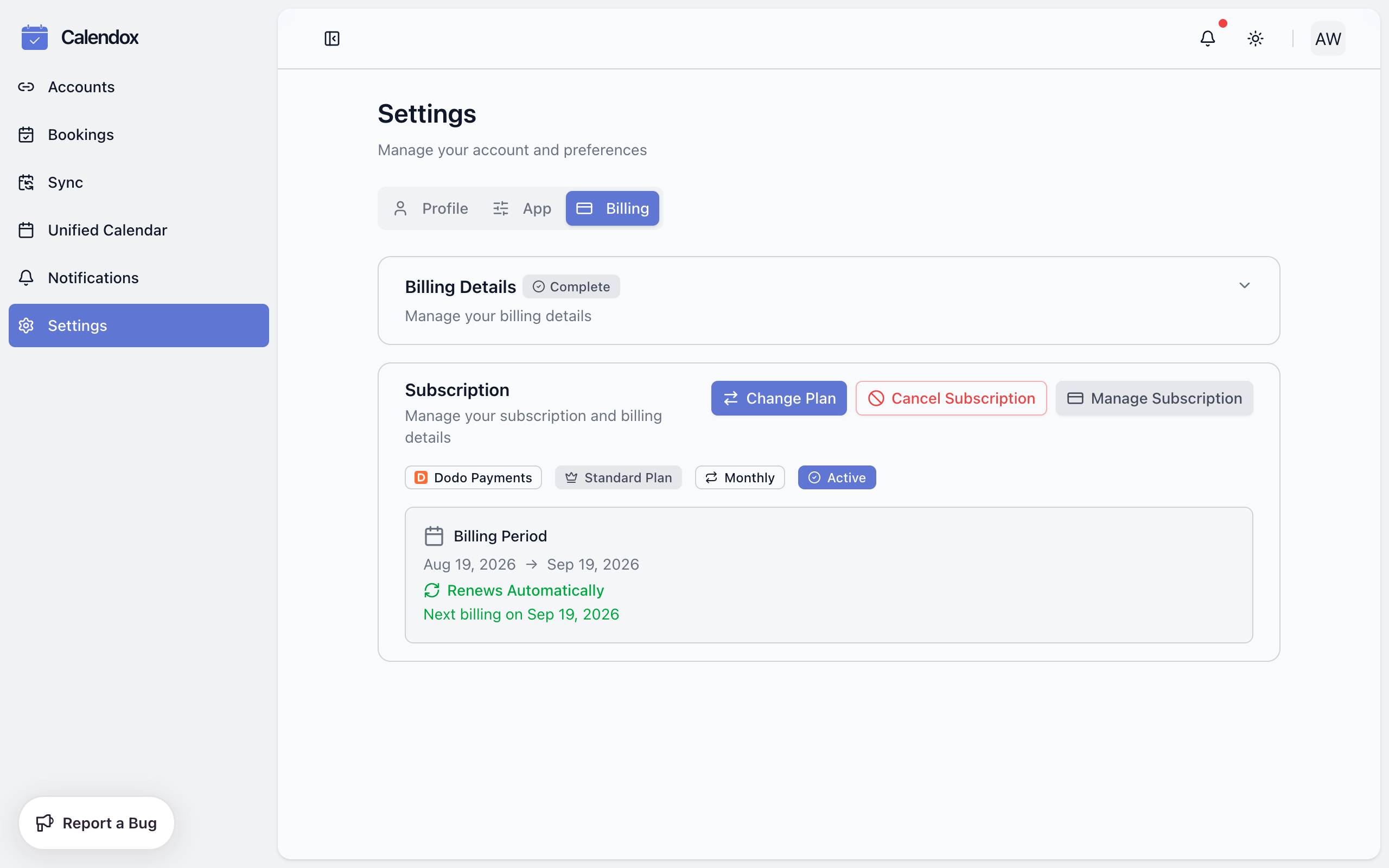
Upgrades take effect immediately and you're charged the full price difference between the two plans right away. It isn't reduced for the days left in the period.
Downgrade, switch billing cycle, or cancel
Downgrades and switching between monthly and annual billing are deferred to your next billing date, so you always get the full period you already paid for. You can only have one pending change scheduled at a time — cancel the pending change before scheduling another.
A downgrade is only accepted if your current usage fits the target plan. If you have more connected calendars, active syncs, or booking pages than the lower tier allows, the change is rejected with a message listing what's over the limit — remove the extra usage first, then retry.
Cancelling keeps your plan and syncs active until the end of the current billing period; after that, your subscription ends and syncs are paused. You can undo a scheduled cancellation at any time before the period ends.
Two ways to pay
- By card — subscribe from Dashboard → Settings → Billing. Calendox accepts major credit and debit cards through the secure checkout; Calendox does not store your card details directly.
- Through the Microsoft Marketplace — purchase Calendox under the Microsoft Standard Contract, billed to your existing Microsoft billing account or Azure subscription. Nothing new to onboard: no vendor verification, no card, and the subscription is managed from the Microsoft 365 admin center like your other Microsoft services. Ideal when your company can't pay external vendors directly or has a strict procurement process. See the full guide: Microsoft Marketplace.
The sections below (upgrades, downgrades, payment failures, refunds) describe card subscriptions. Marketplace subscriptions are billed and changed through Microsoft instead — see the Marketplace guide.
What happens when a payment fails?
A failed renewal payment puts your subscription on hold for a 3-day grace period. Your plan and syncs stay active during this window. You'll see an Action Required — Payment Failed banner in Settings → Billing with an Update Payment Method button, and payment succeeding within the window restores everything automatically.
If payment isn't recovered within 3 days, your subscription expires and syncs are paused until you resubscribe. See Sync status for how paused syncs appear and recover.
Refunds
Refunds are available within 14 days of your initial purchase if you haven't used the service extensively. Submit requests within 30 days of the original purchase date to support@calendox.com with your account email and transaction ID.
Enterprise
Enterprise can be purchased directly through Calendox or via the Microsoft Marketplace, and is billed and managed differently from Basic/Standard/Premium. See Enterprise accounts for tenant-wide admin consent, license seats, and how billing and cancellation work for Marketplace subscriptions.
Next steps
- Personal, Business, and Enterprise accounts — which account type fits you
- Team management — seats and licenses on Business accounts
- What is Bookings? — what booking pages include on each plan
- Pricing — current prices and plan comparison
Personal, Business, and Enterprise Accounts
The differences between Calendox Personal, Business, and Enterprise accounts — features, billing models, and how to choose the right type.
Microsoft Marketplace
Buy Calendox through the Microsoft Marketplace and pay on your existing Microsoft bill under the Microsoft Standard Contract, with no new vendor onboarding.